

With the lowest active real estate inventory on record, it’s harder than ever to find home sellers. But with a good real estate digital marketing strategy, and some effort, you’ll be able to attract those leads!
Research shows that the vast majority of home sellers choose to work with the first agent they contact, so staying top of mind is critical.
As home selling heats up this spring, you can make sure you’re getting to sellers first with home valuation ads from Postamo– a fast, easy, and effective way to do digital marketing in today’s real estate market.
Here are just a few ways that Postamo can help you generate those real estate seller leads.
Create a home valuation ad:
A home valuation ad is a great way to reach local potential home sellers. Postamo offers pre built landing pages like automated home valuations to help you snag seller leads. Potential sellers submit a form to request a personal home valuation, from you! You also have the option to direct your seller leads to your own website.

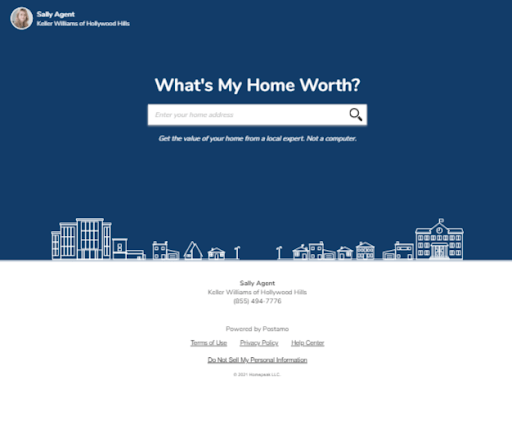
How to create a Home Valuation Ad using Postamo:
- Sign in to your Postamo account
- Click on the ADS tab at the top of the page (if on desktop)
- Click create under Home Valuations
- Edit your ad with a headline at the top and bottom, and make sure your contact information, brokerage logo, and profile photo are crystal clear and correct then click save and preview
- Preview your ad then click next
- Select your landing page. When viewers click on your ad, this is the page they will be directed to. You can enter a url to your own website, or choose the Postamo landing page offered which has a variety of designs you can choose from, and contains your contact information as well. Once that’s selected, click next
- Choose your local targeting. This is where you can select a location and targeting radius. You may enter to target your ad near the listing address, in a ZIP code, or city of choice then click next
- Choose your schedule and budgeting targeting. Select the start date, end date, and budget for your ad. Ad views are based on the budget, and will be distributed across the duration of your ad. Then click next
- Review and approve your ad. Make sure all ad details are correct, enter a method of payment and any coupon code you have then click “purchase.”
Once your ad is scheduled. You will receive an email confirmation. Once your ad is officially running, you’ll be able to log in, click on ADS, click “view details” and track your ad performance. You may also edit your ad at any time if you feel the need to do so.
Create a profile ad
Promote yourself and the services you offer. A “myself” ad allows for the focus to be on you and your expertise rather than promoting an active listing. You have the option of choosing your Postamo profile as the landing page, or your own website. Any leads that you generate from your Postamo profile landing page will be sent to the email associated with your Postamo account.

How to create a profile Myself Ad using Postamo:
- Sign in to your Postamo account
- Click on the ADS tab at the top of the page (if on desktop)
- Click create under Myself
- Edit your ad with a headline at the top and bottom, and make sure your contact information, brokerage logo, and profile photo are crystal clear and correct then click save and preview
- Preview your ad then click next
- Select your landing page. When viewers click on your ad, this is the page they will be directed to. You can enter a url to your own website, or choose the Postamo landing page offered which has a variety of designs you can choose from, and contains your contact information as well. Once that’s selected, click next
- Choose your local targeting. This is where you can select a location and targeting radius. You may enter to target your ad near the listing address, in a ZIP code, or city of choice then click next
- Choose your schedule and budgeting targeting. Select the start date, end date, and budget for your ad. Ad views are based on the budget, and will be distributed across the duration of your ad. Then click next
- Review and approve your ad. Make sure all ad details are correct, enter a method of payment and any coupon code you have then click “purchase.”
Each month, hundreds of real estate agents successfully execute advertising campaigns with Postamo, putting themselves in front of thousands of potential home buyers and sellers.
When you work with Postamo, we will make sure your ad is seen by the right people in your local area, highlighting your expertise as a real estate professional.
Take advantage of the Reputation Tool
Postamo’s new reputation tool helps you take control over your online reputation so you can respond quickly, and encourage your real estate clients to submit their reviews where you need them most.
You can easily track reviews across sites like Zillow, Yelp, Google, and Facebook all under one platform, and request reviews from your real estate clients with one click of a button.
Click here to read more about this exciting new feature! Not yet confined why agent reviews are critical to your success? Check out this blog article to learn more about why reviews are important.
We look forward to working to help get you more listings this year!
If you have any questions please let us know by submitting an email to us at support@postamo.com or by calling/texting us at 855-494-7776.

 Postamo