
We’re excited to start offering a new type of ad campaign to our Postamo Pro service.
Just like our popular listing ads, creating our agent ads is dead simple and all ads are targeted to people who have shown an interest in buying or selling a home.
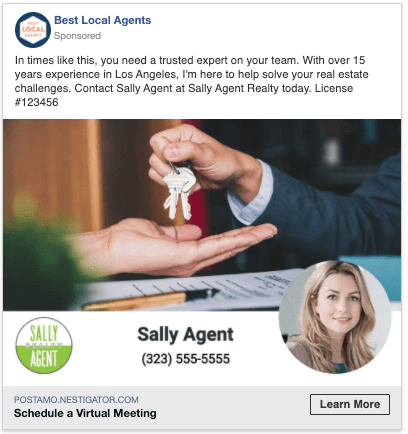
What’s great about these new ads is that the focus is YOU. So they are relevant in attracting prospects even when you don’t have an active listing.
Given the current climate related to COVID-19, these ads provide a simple and cost effective solution for agents who want to get their name out in the market and let prospects, and existing clients know that they are available and ready to help assist them.
Best of all, for Postamo Pro subscribers, these ads start with budgets as low as $29, which is enough to reach thousands of people. Given that our Postamo Pro service is currently just $10/month, that’s about as cost-effective as you can get. Perfect timing when we’re all being conscious about costs.
Here’s a summary of the Agent Ads
- Our simple ad creative tool combines a background photo, agent photo, contact info and brokerage logo into a compelling ad unit that complies with Facebook and Instagram display requirements.
- Completely customizable ad creative is controlled by the agent, so you can tell your own story, and ensure compatibility with local rules and regulations.
- Choose to send traffic to your existing Postamo Agent Profile, or provide your own landing page, such as your brokerage website.
- All ads displayed on Facebook and Instagram and are targeted to people who have expressed an interest in buying or selling residential real estate near the ZIP code you choose.
- Agents select when the ads start, and can run the ads from 2 to 21 days.
- No Facebook account required.
- Ad budgets start at $29 and the budget is distributed across the duration of the ad.
Access to purchase these ads is available to Postamo Pro, or Brand Pro subscribers. Don’t have a subscription yet? We’ll discount your first ad by $10.
Ready to get started? Just Sign In to your Postamo account and click the Ads tab. Then click the Create button in the “Myself” pod to start building your ad.
Then, tell us what you think!

 Postamo